
ADT+
ADT LLC ®Lifestyle
4.71.19K Reviews
- Version
- 4.6.0.329951
- Installs
- 100.00K
- Age Rating
- Everyone
Screenshots
Our Review of ADT+
 Analysis by Appyee
ADT+ is a lifestyle app for people who want to manage their home-security experience from a phone rather than treating the alarm system as something controlled only from a wall panel. I spent time looking at it from the angle that matters most with a security product: not just whether the interface feels convenient, but whether the app makes important choices understandable and keeps the user in control.
The app is free to install, is rated for Everyone, and comes from ADT LLC ®. It has built a visible audience, with an average rating of 4.7 from around 11 thousand ratings and more than 100 thousand installs. Those figures suggest that it is not an experimental companion app, although popularity alone is not proof that it will suit every household.
My overall impression is that ADT+ makes the most sense when it is part of an ADT home setup. It is not a general-purpose smart-home dashboard that I would choose simply to collect unrelated devices in one place. Its value is tied to having an ADT-centered way to interact with protection at home, check what is happening, and make decisions remotely. That focus is both its main strength and its main limitation.
Trust starts with knowing what the app is for
Security apps deserve a different standard from ordinary lifestyle tools. A music app can be annoying if it forgets a preference; a home-security app can create real stress if an alert is unclear or if I cannot tell whether an action succeeded. With ADT+, I would begin by treating it as a control point for an existing security relationship, not as a standalone promise that a phone app can protect a home by itself.
That distinction is important when comparing it with common alternatives. A camera manufacturer's app may be better for browsing one camera's recordings, while a broad smart-home platform may offer more freedom across brands. ADT+ is more appealing when I want a security-focused experience associated with ADT rather than assembling several independent apps and hoping they behave consistently.
The developer identity is clearly associated with ADT LLC ®, and the app's stated purpose is direct: helping users protect their homes and gain peace of mind. I prefer that clear positioning to an app that tries to be a social feed, shopping tool, automation hub, and alarm interface all at once. The narrower purpose makes it easier to judge whether it belongs on my phone.
At the same time, I would not install it casually on a shared device without first deciding who should have access. A home-security account can expose information about routines, alerts, and the state of a property. The practical question is not only “Can I use this app?” but also “Who in my household genuinely needs access, and what should each person be allowed to do?” That is the kind of decision I would make before inviting family members or leaving a session active on a tablet.
What the app does well in everyday use
The strongest use case is a person who wants a single mobile point of contact with an ADT setup while away from home. Imagine leaving for work and later wondering whether the house is secure. A focused security app is useful in that moment because it gives me a place to check the situation instead of relying on memory or driving back to look at a panel.
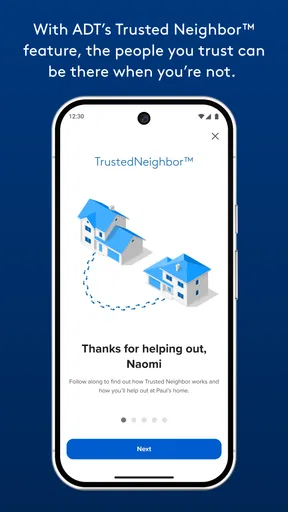
Another realistic scenario is a household with different routines. One person may leave early, another may return late, and a visitor may need access at a different time. The app becomes valuable when it helps the people responsible for the home coordinate without sharing one person's entire phone or account. I would still review every available account option carefully before granting access, because convenience should not automatically mean equal control for everyone.
I also see value for users who dislike switching among separate apps. If the ADT experience is already central to the home, keeping security-related actions together can reduce the chance of opening the wrong application during a tense moment. That sounds small, but clarity matters when I am responding to an alert or trying to confirm the home's status quickly.
Controls should be judged by clarity, not by quantity
When I evaluate a security app, I look for visible choices rather than assuming that a long feature list equals good control. ADT+ is more trustworthy when each important action tells me what it will affect, what state the home is in afterward, and whether the app actually completed the request. A button that looks simple but leaves the result ambiguous is not genuinely simple.
This is also where account controls matter. I would look for ways to review who can use the account, remove access that is no longer appropriate, and keep personal responsibility separate from a guest's access. Those checks are especially important after a roommate moves out, a family arrangement changes, or a phone is lost. The best habit is to review access during those life changes rather than waiting for a problem.
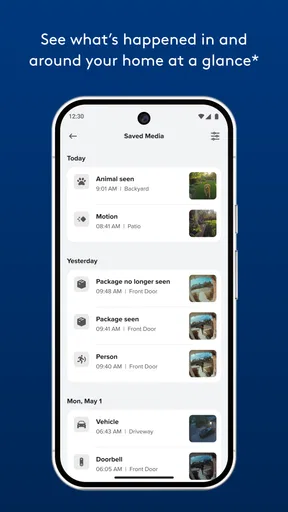
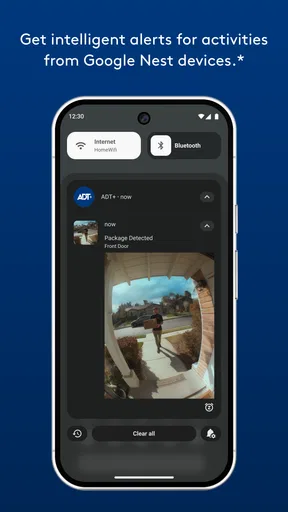
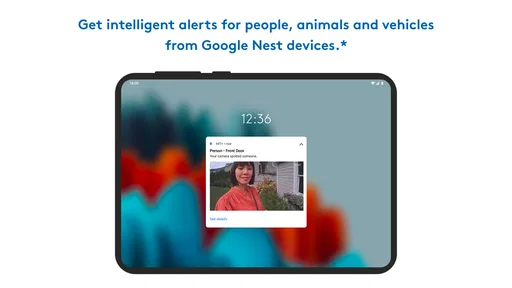
I would also pay attention to confirmation behavior. For a security action, I want a clear visual result and enough context to distinguish a completed action from a request still being processed. If the app presents an alert, I would read it instead of dismissing it automatically. A notification can be useful only when I understand whether it requires immediate attention, a routine check, or a change to my account settings.
One practical tip is to spend a quiet afternoon learning the app before depending on it during travel. I would open each main area, identify where account settings live, check how alerts are presented, and make sure the people at home know which phone should be used if something goes wrong. This preparation is more valuable than discovering the interface while standing in an airport or dealing with a late-night notification.
Data-sensitive moments deserve extra attention
A home-security app naturally sits close to sensitive parts of daily life. Even without discussing details that are not visibly confirmed in the app information, I would treat account activity, home status, alerts, and any connected security context as private. That means using a strong device lock, avoiding an unattended shared phone, and being selective about who can see notifications on the lock screen.
Notification previews are an easy detail to overlook. If my phone displays security information while it is on a desk or in a car, someone nearby may learn more than I intended. I would review the phone's notification settings and choose a preview style that matches my household's privacy needs. This is not an ADT+ feature claim; it is a sensible layer of control around any security app.
I would also separate convenience from trust. A request for access, a sign-in prompt, or an alert should be handled inside the expected app flow rather than through a suspicious message. If something looks unusual, I would pause and verify the account directly instead of tapping quickly. Security products should encourage careful habits, and users should bring the same caution to the surrounding phone environment.
Another useful routine is to remove old devices and unused sessions when changing phones. I would not assume that deleting the app from an old device is the same as reviewing account access. The safer approach is to check the account and device settings that are actually visible, then revoke anything I no longer recognize or need. This is a concrete way to keep user agency after a phone upgrade.
Where ADT+ may feel less flexible than alternatives
The app's focused identity can be a drawback for someone who wants an open-ended smart-home command center. If my priority is mixing products from several manufacturers, comparing cameras side by side, or building elaborate routines across unrelated devices, a broader platform may be a better fit. ADT+ should be chosen for its connection to an ADT-centered security experience, not because its name suggests that it replaces every other home app.
I would also skip it as a primary choice if I do not have a reason to use ADT's ecosystem. Installing a security companion without the corresponding home setup would not give me the same value as it gives an existing customer. In that situation, a standalone camera app, a local alarm solution, or another platform designed around the equipment I already own may be more practical.
There is a trade-off between a managed security relationship and maximum independence. A focused provider app can feel more coherent than several disconnected tools, but it may also mean that my experience is shaped by the provider's account structure and supported equipment. Before committing, I would identify which parts of my home I expect to manage through the app and whether I am comfortable keeping those responsibilities within one ecosystem.
The current version is 4.6.0.329951, and the app requires Android 12 or later. That requirement is worth checking before planning to use an older spare phone as a household control device. A technically capable app is not useful if the only device I want to keep in the hallway cannot install or run it. I would also keep the phone's operating system current, since account and security apps should not be treated like disposable utilities.
How I would set it up for a household
I would start with the primary account holder and make sure that person's phone has a reliable lock method. Next, I would decide which household members need access and why. Someone who only needs awareness may not need the same control as the person responsible for the security system. Even if the app offers a particular sharing arrangement, the principle remains the same: give people the smallest level of access that still solves the practical problem.
After that, I would test the routine at a low-pressure time. I would check that the right person receives the expected notification, confirm that the app's wording is understandable, and make sure everyone knows what to do if a phone is unavailable. This avoids a common mistake: assuming that an app is ready for emergencies simply because it opened successfully during installation.
For travel, I would prepare before leaving rather than making changes from a hotel room. I would review who has access, confirm that my phone can sign in, and avoid sharing credentials as a shortcut. If another person needs to help at home, a proper account arrangement is safer and easier to audit than passing around one password.
For a former resident or temporary guest, I would make access review part of the departure checklist. The same applies after replacing a phone, changing a household arrangement, or noticing an unfamiliar sign-in. These are not glamorous features, but they are the habits that turn a security app from a remote control into a responsibly managed account.
My experience of the app's value
What I like most about ADT+ is the way its usefulness is easy to explain: it gives an ADT household a mobile-facing way to stay connected to its security setup. That is more meaningful than a vague promise of convenience. I can see why the app has earned a 4.7 average and attracted around 1.2 thousand written reviews, although I would still read recent user comments for issues relevant to my own phone and setup.
The free price also lowers the barrier to trying the app, but I would not confuse a free download with a complete security solution. The important value comes from how it fits the broader ADT arrangement. Before relying on it, I would make sure I understand the account relationship, the equipment involved, and which actions I am personally responsible for.
My main caution is psychological: a phone interface can make home protection feel effortless, even though the underlying decisions still deserve attention. I would not dismiss alerts without understanding them, grant access merely for convenience, or assume that a successful installation means every household member is prepared. The app can support good security habits, but it cannot create those habits automatically.
Who should use it and who should pass
I would recommend ADT+ to an ADT customer who wants a straightforward mobile connection to home security, especially someone who travels, shares responsibility with family, or wants to check the home without relying on a fixed control panel. It is also a reasonable choice for a household that values one provider-focused experience more than a collection of independent apps.
I would be more hesitant for a person who wants broad compatibility across many brands, complete independence from a security provider, or a specialist camera application with deeper tools for one particular camera line. That user may be happier with the equipment maker's own app or a platform built around cross-brand control.
I would also advise caution for anyone using an older Android phone, sharing a device with people outside the household, or unwilling to review account access periodically. Those are not reasons to reject the app automatically, but they are signs that the surrounding setup needs attention before the app becomes part of a daily security routine.
In the end, I see ADT+ as a focused lifestyle app with a serious responsibility. It is at its best when I use it as one carefully managed part of an ADT home-security setup, keep access intentional, and treat notifications as information that deserves context. The strongest reason to choose it is not the download itself, but the combination of a familiar security provider and a mobile control point that fits the way my household actually lives.
Released on December 7, 2022, and available for Android 12 and newer, it is mature enough to be considered by the right audience while still deserving the same careful account and privacy review I would give any security tool. For an ADT household, I would recommend trying it free and learning its controls before depending on it. For everyone else, I would first compare the app's provider-centered approach with the flexibility of the alternatives already compatible with their home.
Verdict
Strengths of ADT+
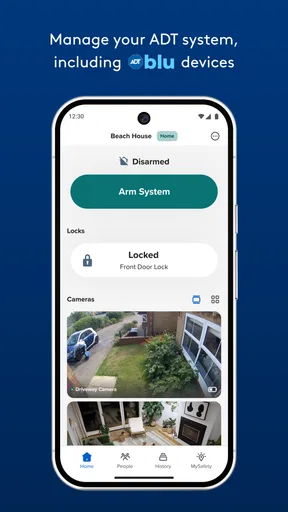
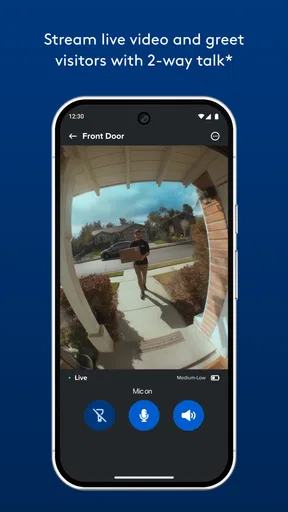
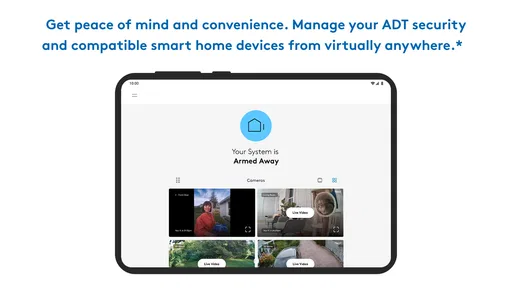
- Live access to ADT security cameras and alarm activity.
- Remote control for compatible locks, lights, and smart-home devices.
- Custom alerts help you stay informed about important security events.
- Supports multiple properties under one account.
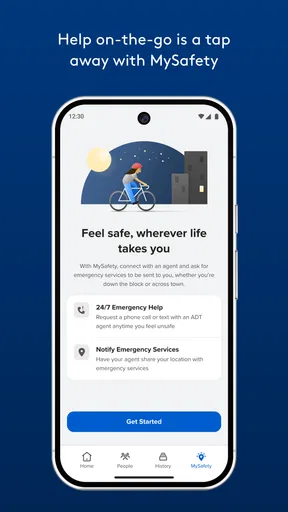
- Professional monitoring features add reassurance during emergencies.
Limitations of ADT+
- Many features require an active ADT subscription.
- Device compatibility may vary by security system and equipment model.
- Video streaming can use significant mobile data.
- Some advanced controls depend on a stable internet connection.
- App performance may differ across older phones and operating systems.
Similar Picks in This Category
View All
SmartThings
Samsung Electronics Co., Ltd.4.6

Google Home
Google LLC4.0

Pinterest4.2

Astrotalk - Talk to Astrologer
Astrology & Horoscope4.7

My Verizon
Verizon Consumer Group4.5

Samsung Wallet (Samsung Pay)
Samsung Electronics Co., Ltd.4.1
Frequently Asked Questions
What is ADT+ and what can I use it for?
ADT+ is the mobile companion app for ADT security customers, designed to help you monitor and manage compatible home security equipment from an Android or iOS device. Depending on your ADT plan and installed hardware, you may be able to arm or disarm the system, view cameras, receive alerts, control smart locks or lights, and check activity remotely. Available features can vary by location, subscription, and equipment.
Do I need an ADT subscription or compatible equipment to use ADT+?
Yes. ADT+ is primarily intended for people who have an active ADT service plan and compatible security devices installed at their property. The app itself may be downloadable without a subscription, but most important functions require an ADT account and supported equipment, such as a security panel, sensors, cameras, or smart-home accessories. Before downloading, confirm that your system is supported and linked to your account.
Can ADT+ monitor my home and send security notifications?
ADT+ can provide monitoring tools and notifications when your account and devices support them. You may receive alerts about alarms, sensor activity, video events, system status, or other connected-home activity. Notification behavior depends on your settings, internet connection, phone permissions, battery optimization, and ADT service level. The app should complement, rather than replace, emergency procedures and professional monitoring.
Can I use ADT+ to control cameras, locks, lights, or other smart devices?
With compatible ADT equipment and integrations, ADT+ may allow you to view live camera feeds, review recorded clips, lock or unlock supported doors, adjust connected lights, and manage other smart-home functions. The exact controls are not identical for every customer because they depend on the devices installed and the services included in the account. Some features may require additional setup or fees.
Is ADT+ easy to set up, and what should I check before downloading it?
Setup is generally straightforward if your ADT account and equipment are already active: install the app, sign in with your account, allow required permissions, and follow the prompts to connect your system. Before downloading, check your phone’s operating-system compatibility, ensure reliable internet access, and verify that you know your ADT login details. Also review privacy permissions, notification settings, and any subscription requirements.
